
Invoice confirmed bookings and send talent their statements from the same records.
The job is on the calendar and the fee is agreed. Turn it into an invoice with a few clicks, record the payment when it lands, and send the talent a statement showing what they earned and what the agency kept.
7-day free trial · Cancel anytime
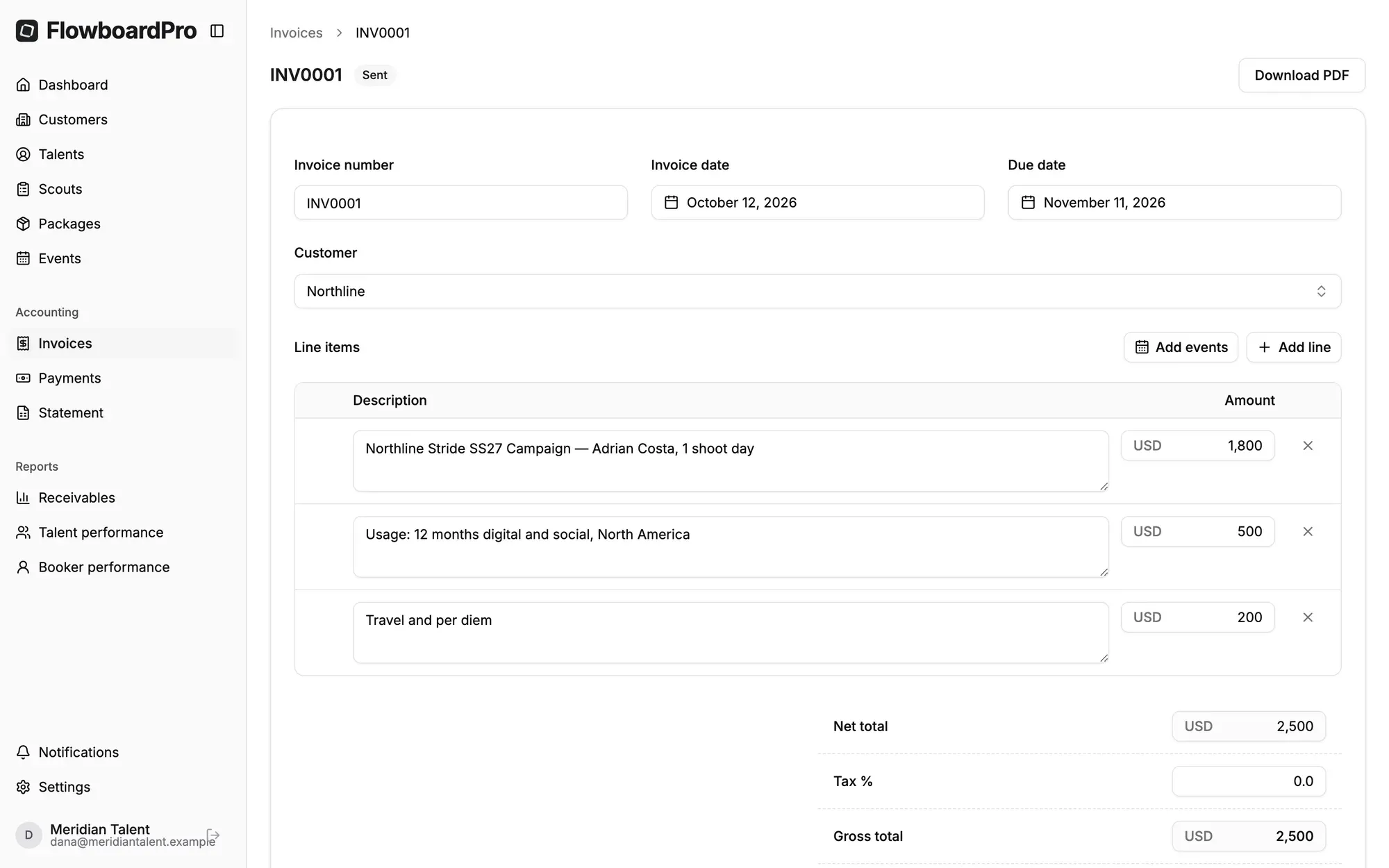
Invoice what you’ve booked
At month end, most agencies rebuild their invoices by hand from the calendar and hope nothing slips through. In FlowboardPro, you pick a client and their confirmed bookings are ready to add as line items, with amounts already filled in from the booking. Each booking can be invoiced only once, so a job can’t be billed twice or forgotten. Add your own lines for usage, travel or expenses, and your agency’s numbering, currency and tax rate are applied automatically.
- Bookings become line items. Confirmed bookings for the client, with amounts filled in from the booking.
- Nothing billed twice. A booking already on an invoice can’t be added to another.
- Custom lines for usage fees, travel, expenses or anything else.
- Your defaults. Invoice number prefix, currency, tax rate and a 30-day due date, all set automatically.
- Branded PDF invoice, ready to send.
Invoice status that updates itself
Knowing which invoices are actually paid shouldn’t mean checking the bank account against a spreadsheet. Invoices move from draft to sent to paid, and FlowboardPro marks an invoice paid as soon as the payments recorded against it cover the total. If an invoice was raised in error, void it instead of deleting it, so the record and its number stay intact.
- Draft, sent, paid, void. A clear status on every invoice.
- Paid automatically once payments cover the total.
- Void, don’t delete. Only drafts can be deleted, so sent invoices always leave a record.
Payments as they really arrive
Clients don’t always pay the round number on the invoice. Some pay in instalments, and many withhold tax at source. Record each payment exactly as it arrives: the amount received, any tax withheld, the date, the method and a reference. Attach the remittance advice or receipt so the evidence is next to the number.
- Several payments per invoice, for deposits and instalments.
- Tax withheld at source counts towards settling the invoice, so it doesn’t look underpaid.
- Method and reference: bank transfer, card, cash, cheque or other.
- Attach the receipt as a PDF or image.
Talent statements
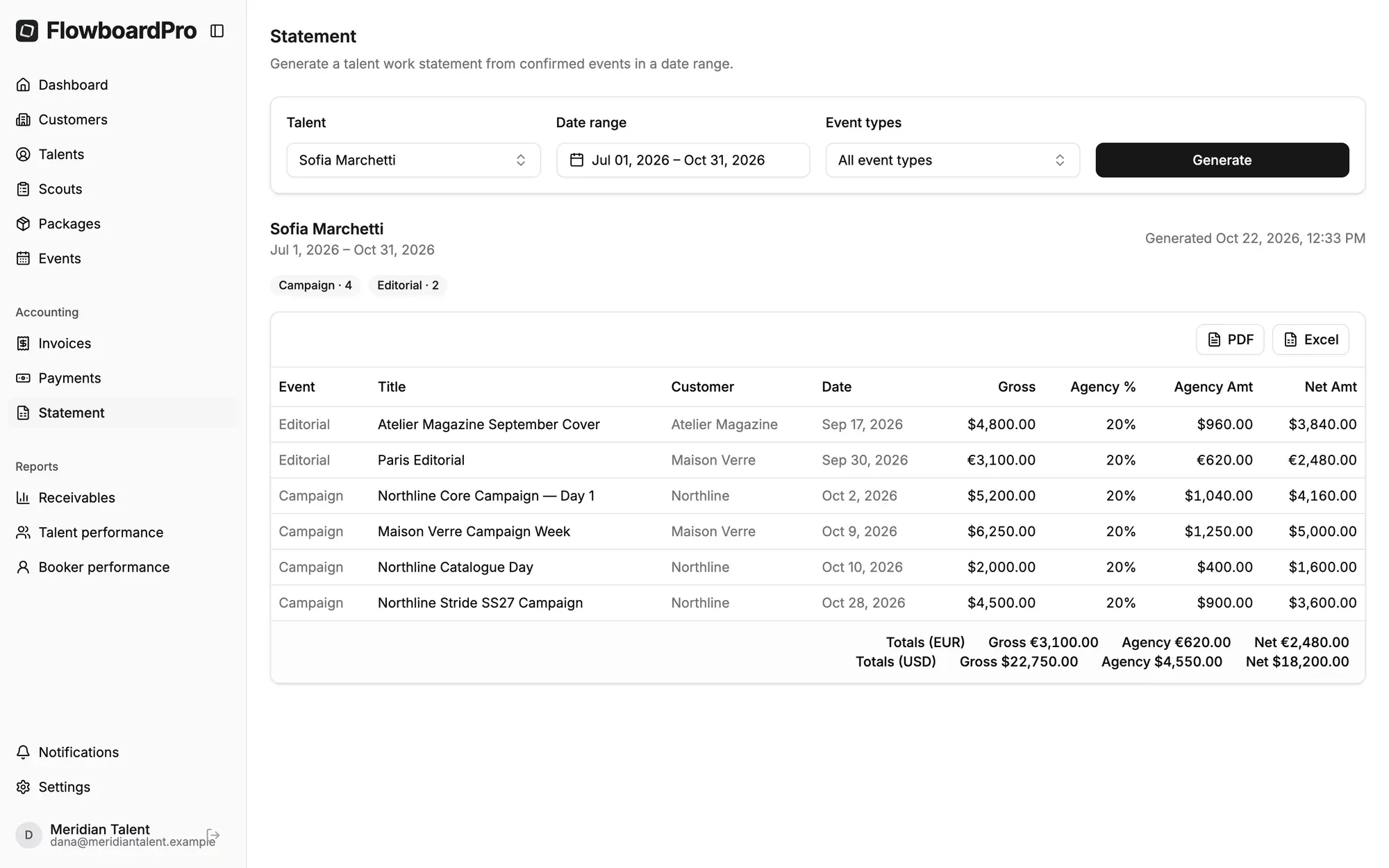
Talent want to know what they earned, and “trust us” isn’t an answer. Pick a talent and a date range, optionally limited to certain booking types. FlowboardPro lists every job with the talent’s gross fee, the agency’s commission and the net amount due to them. The split comes from the contract on their profile, so the figures are consistent every time.
- Per-job breakdown: gross fee, agency commission and net to talent.
- Based on the contract: the commission split recorded on the talent’s profile.
- Filter by booking type, for example only shoots, or only a campaign.
- Export as PDF or Excel to send to the talent or your accountant.
Multi-currency
Agencies working across borders book in euros, pounds and dollars in the same month. Every booking, fee and invoice carries its own currency, and totals are always shown per currency, never converted with an exchange rate you didn’t choose.
- Book and invoice in the client’s currency.
- Totals are shown per currency and never blended.
More from FlowboardPro
All featuresStart running your agency with FlowboardPro
Bring your roster, packages, bookings and billing into one workspace built for model and talent agencies.
7-day free trial · Credit card required · Migration help available